QR Codes on the Command Line
I recently got a new Android phone and found that QR codes were a cool, quick way to transfer URLs and text. There were a couple cases where I found it useful to automatically generate the QR code and display it on my laptop screen for me to scan with my phone.
Instead of generating the codes as a png with an existing program and opening them in my image viewer, I figured I’d hack together a quick ruby script to do the job. Here’s the result.
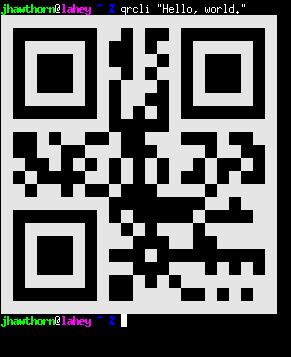
It encodes either its first argument or standard input to a QR code and prints that directly to the terminal with a small white border. I’ve found that the ZXing scanner program has a very easy time reading this. It automatically choses the smallest size of code which can fit the input, and has the lowest setting for error recovery.
Here’s the script:
This requires the rqrcode gem and a terminal supporting ANSI color escape sequences (which is pretty much everything).